
Cuckoo Clock 3D Screensaver1.0 - Download
You'll be able to download in few seconds.
Publisher Description
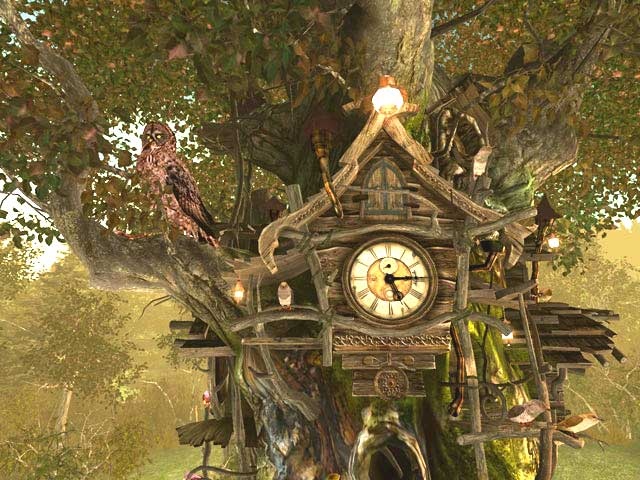
Cuckoo Clock 3D is a wonderfully crafted deep forest fantasy, that recreates a scene from a fairytale right on your Windows desktop. When you give your PC some rest, the desktop picture changes into a magic fairy world. A deep forest with a great old tree, cuckoo clocks, butterflies and fireflies appear on your screen. The animation is so real, that it seems that you can touch the tree and feel the leaves rustling. You will enjoy the original design from the first sight, graphically Cuckoo Clock 3D is incredible. Cuckoo Clock 3D pleases the eye with high resolution images, pleasant scenery and realistic animation effects. This magnificent screensaver immerses you into the atmosphere of a fairytale, and no doubt that Cuckoo Clock 3D will be the favorite entertainment for the whole family or your office colleagues. A perfect tool to remind of the time without disturbance and stress.
The Cuckoo Clock screensaver is displayed in true 3D from the first-person perspective. Cuckoo Clock 3D looks as if 4 original wooden clocks grow or built in the huge old tree. There are 4 amazing cuckoo birds living in their small clock-houses on this big fairy tree. They peek out at each solid and half hour and sing their song. The picture is different in the day and night: you can see the wonderful forest lit with the daylight, amazing birds and butterflies, while during the night a lot of fireflies will twinkle on your screen. The sounds change also, depending on the time of the day. The clock shows real computer clock time. No doubt, Cuckoo Clock 3D is a great addition to your desktop, making your home or office a cozy and tranquil place.
About Cuckoo Clock 3D Screensaver
This Screen Savers: Other program is available in English. It was last updated on 29 September, 2026. Cuckoo Clock 3D Screensaver is compatible with the following operating systems: Windows.
The company that develops Cuckoo Clock 3D Screensaver is 3Planesoft. The latest version released by its developer is 1.0.
The download we have available for Cuckoo Clock 3D Screensaver has a file size of 18.9 MB. Just click the green Download button above to start the downloading process. The program is listed on our website since 2006-07-28 and was downloaded 0 times. We have already checked if the download link is safe, however for your own protection we recommend that you scan the downloaded software with your antivirus. Your antivirus may detect the Cuckoo Clock 3D Screensaver as malware if the download link is broken.
How to install Cuckoo Clock 3D Screensaver on your Windows device:
- Click on the Download button on our website. This will start the download from the website of the developer.
- Once the Cuckoo Clock 3D Screensaver is downloaded click on it to start the setup process (assuming you are on a desktop computer).
- When the installation is finished you should be able to see and run the program.
Program Details
System requirements
Download information
Pricing
Version History
version 1.0
posted on 2006-07-28
New release
Disclaimer
External Download
We do not host Cuckoo Clock 3D Screensaver on our servers. We did not scan it for viruses, adware, spyware or other type of malware. This app is hosted by the software publisher and passed their terms and conditions to be listed there. We recommend caution when installing it.
The external download link for Cuckoo Clock 3D Screensaver is provided to you by apps112.com without any warranties, representations or guarantees of any kind, so access it at your own risk.
If you have questions regarding this particular app contact the publisher directly. For questions about the functionalities of apps112.com contact us.
